 How-to
How do you troubleshoot water heater pilot light issues?
Last Updated: October 26, 2026
Quick Summary
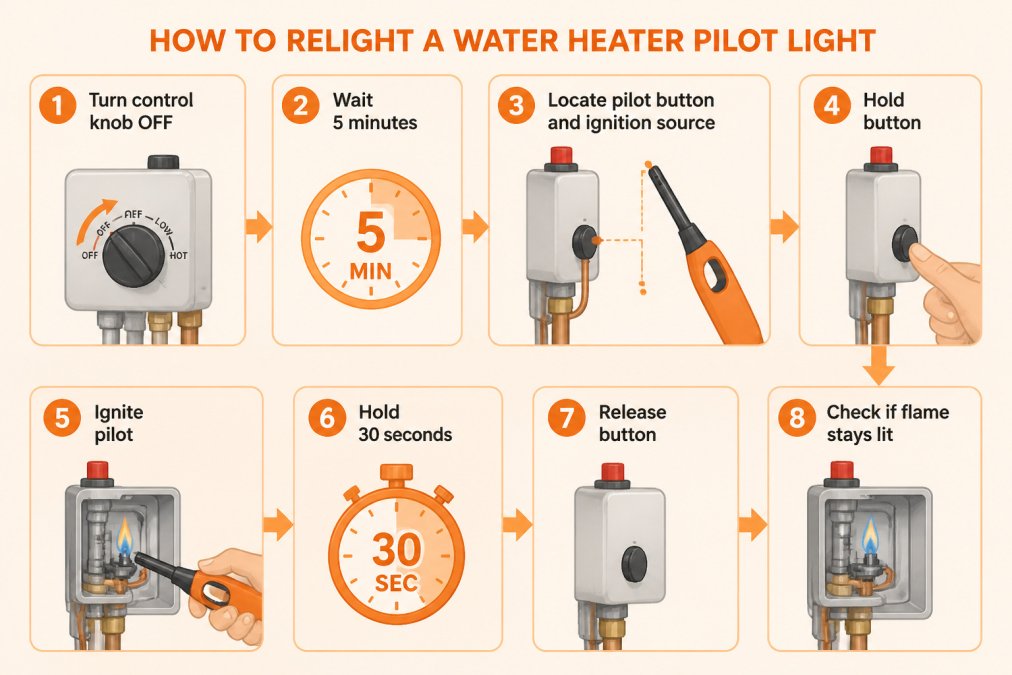
To troubleshoot a water heater pilot light, turn the control knob to OFF and wait five minutes, then locate the pilot button and ignition source on your unit. Hold the pilot button down while igniting with a long lighter, keep holding for 30 seconds as the thermocouple warms, then release slowly and turn the knob to ON.
- Turn the control knob to OFF and wait five minutes before attempting to relight the pilot
- Hold the pilot button down for 30 seconds while the thermocouple warms after ignition
- If the flame goes out after relighting, the thermocouple may be faulty or dirty
- Always follow your unit's manufacturer instructions for the exact relighting method
- Never work on a gas water heater if you smell gas or suspect a leak
Table of Contents
- Safety First: Before You Touch Your Water Heater
- How to Relight a Water Heater Pilot Light
- Why Your Water Heater Pilot Light Keeps Going Out
- Frequently Asked Questions
Safety First: Before You Touch Your Water Heater
Never work on a gas water heater if you smell gas or suspect a leak.
How to Relight a Water Heater Pilot Light
Most gas water heaters use a pilot light to ignite the main burner; relighting is straightforward if you follow the manufacturer's instructions. Turn the control knob to OFF and wait five minutes, then find the pilot button and ignition source, a red ignition button or piezo igniter, and check your unit's label for the exact method. Hold the pilot button down while igniting with a long lighter, keep holding 30 seconds as the thermocouple warms, then release slowly. If the flame stays lit, turn the knob to ON and test your hot water; if it goes out, the thermocouple may be faulty or dirty. Learn more about common water heater problems that may relate to pilot light issues.
Why Your Water Heater Pilot Light Keeps Going Out
We connect homeowners with local, licensed and insured plumbers who bid competitively, so you get a fair price for quality work. Get an instant water heater replacement quote, a plumber confirms the final price on-site after bidding.
Frequently Asked Questions
How can you tell if the pilot light is out on your water heater?
If there's no hot water and you hear the burner trying to ignite but failing, the pilot light is likely out. Look at your water heater's status light or viewing window (if your model has one). A missing flame or dark window indicates the pilot is out. Gas water heaters need an active pilot flame to signal the main burner to ignite, so no pilot means no heat.
Why does my water heater pilot light keep going out?
The most common cause is a faulty thermocouple, which senses the pilot flame and tells the gas control valve to stay open. When it fails, the valve closes and the pilot goes out. Other causes include a dirty pilot orifice blocking gas flow, inadequate combustion air or draft around the heater, or a bent thermocouple. If relighting works once but the pilot goes out repeatedly within hours or days, thermocouple replacement is usually needed.
How do I know if my thermocouple is bad on my water heater?
A faulty thermocouple shows clear symptoms: the pilot lights normally but goes out within 30 seconds to a few minutes after you release the pilot button, or it won't stay lit at all. If you can relight it and it holds steady for hours, the thermocouple is likely fine. Visible damage, soot buildup, or a loose connection at the control valve also signal thermocouple problems. A professional plumber can test it with a multimeter to confirm failure.
When your pilot light won't cooperate, troubleshooting can save you time. But if the issue persists after these steps, professional help makes sense. A licensed plumber can identify whether repair is possible or replacement is the smarter choice. Get matched with a vetted local plumber through QuickHotWater.com and receive a transparent estimate before any work begins.